

Best Home Security Cameras Without Subscription (2026 Guide)
Finding the best home security camera without subscription is the ultimate goal for homeowners who want robust protection without the endless drain of monthly cloud storage fees. If you have ever...

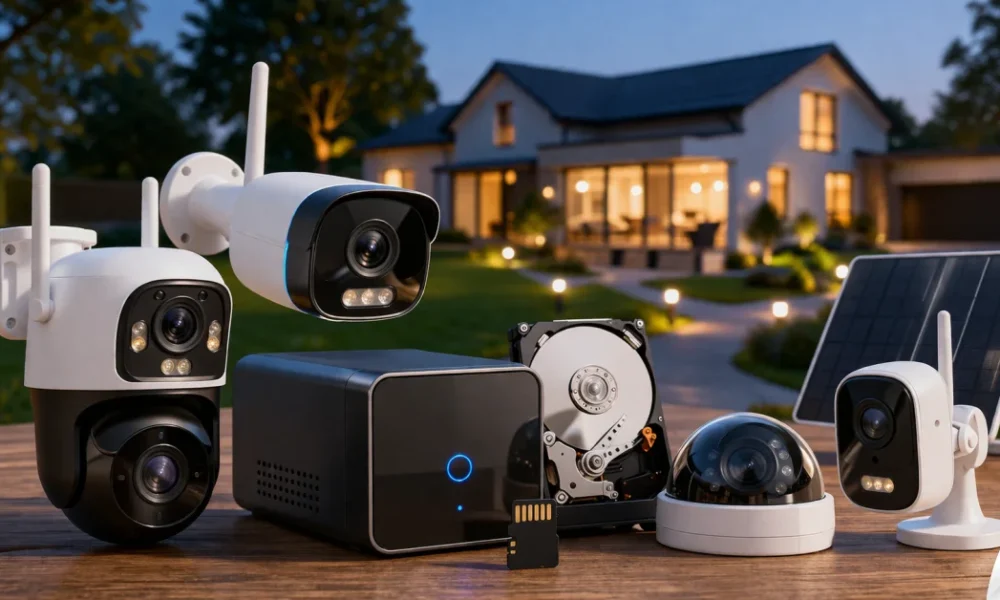
Finding the best home security camera without subscription is the ultimate goal for homeowners who want robust protection without the endless drain of monthly cloud storage fees. If you have ever purchased a smart camera only to realize that basic features like video recording, human detection, and smart alerts are locked behind a paywall, you are not alone. The smart home industry has increasingly shifted toward subscription-based models, forcing consumers to pay indefinitely just to access the hardware they already own. This creates a frustrating scenario where your initial investment is only a fraction of the lifetime cost of the device. Beyond the financial burden, cloud-dependent cameras raise severe privacy concerns; when your footage is processed and stored on a remote server, you lose a degree of control over your personal data. This article will solve that problem by breaking down the top subscription-free security cameras of 2026, explaining how local storage technology works, and guiding you toward a truly private, cost-effective home security setup.
Table Of Content
- What is the Best Choice?
- Signs You Need to Switch to a Subscription-Free System
- Hidden Costs of Cloud Security Cameras
- Top Contenders for the Best Home Security Camera Without Subscription
- 1. EufyCam S4 and the HomeBase S380 ecosystem
- 2. Reolink Argus PT Ultra & Home Hub
- 3. TP-Link Tapo C120 and C425
- 4. Lorex 4K Spotlight & NVR Systems
- Choosing Your Local Storage Format
- On-Board MicroSD Storage
- Local Hubs and Base Stations
- Network Video Recorders (NVR)
- Network Attached Storage (NAS) / RTSP
- Pro Tips for Securing Your Home Like an Expert
- Frequently Asked Questions (FAQ)
- Can I view my subscription-free camera away from home?
- Do local storage cameras work without internet?
- What happens when the local storage is full?
- Are wireless cameras easy to hack?
- How long do batteries last on wire-free cameras?
- What is the difference between PIR and Pixel-based motion detection?
- Best Home Security Camera Without Subscription
While skipping the cloud subscription gives you more control over your video footage, your camera is still an internet-connected device. If it isn’t configured properly, it can become a backdoor for cybercriminals to spy on your family. If your camera’s status light turns on unexpectedly or it starts moving on its own, learn the crucial Signs Your Smart Home Hacking Symptoms | IoT Devices Are Hacked.
What is the Best Choice?
The best home security camera without a subscription typically relies on local storage methods like a built-in hard drive (NVR), a dedicated home hub, or high-capacity MicroSD cards. Currently, brands like Eufy, Reolink, and TP-Link Tapo lead the market by offering advanced features—such as 4K resolution, edge AI person detection, and continuous 24/7 recording—with zero monthly fees. By choosing a system with a centralized local hub or robust on-device storage, you maintain complete ownership of your footage while saving hundreds of dollars in cloud fees over the camera’s lifespan.
Signs You Need to Switch to a Subscription-Free System
Many users start with popular cloud-based brands, only to experience “subscription fatigue” a few months later. If you are experiencing any of the following symptoms with your current setup, it is time to transition to a local-storage alternative:
- Paywalled Basic Features: You cannot view recorded clips, set activity zones, or receive specific person/vehicle alerts unless you upgrade to a premium monthly tier.
- Delayed Notifications: Your camera relies on cloud servers to process motion events, resulting in a 5-to-10 second delay between a person stepping on your porch and your phone buzzing.
- Privacy Anxiety: You feel uncomfortable knowing your indoor or outdoor video feeds are stored on third-party servers, which have historically been vulnerable to data breaches or unauthorized employee access.
- Bandwidth Drain: Your current cameras are constantly uploading high-definition video to the internet, slowing down your home Wi-Fi network and eating into your ISP data cap.
- Useless Offline Hardware: When your internet connection drops, your cloud-dependent camera stops recording entirely, leaving your home vulnerable during power or network outages.
Most modern local-storage cameras are monitored and controlled directly through a dedicated mobile app. Unfortunately, even the most heavily encrypted camera feed becomes completely useless if a hacker has already compromised the smartphone you use to view it. Before you link your home security feed to your mobile device, make sure you check for the Signs Your iPhone is Hacked | 2026 Update.
Hidden Costs of Cloud Security Cameras
To understand why local storage is superior, you have to look at how the home security industry evolved. Ten years ago, CCTV systems were completely closed-loop. You bought cameras, ran cables to a DVR, and stored everything on a spinning hard drive. While secure, these systems were incredibly difficult for the average person to install and maintain.
Then came the Wi-Fi revolution. Companies introduced battery-powered, wire-free cameras that took five minutes to install. However, because these small cameras lacked the physical space and battery power to process heavy video files or store weeks of footage, manufacturers offloaded that work to the cloud. When a camera detects motion, it wakes up, records a clip, and uploads it to an off-site server via your Wi-Fi router. The server then analyzes the footage using AI, decides if it is a human or a stray cat, and sends a push notification back to your phone.
This process is expensive for manufacturers to maintain. Server space, bandwidth, and cloud-based AI processing cost money every second of every day. To subsidize these ongoing server costs, companies introduced mandatory monthly subscriptions. Over time, these subscriptions have crept up from a reasonable $3 a month to $10, $15, or even $20 a month for multi-camera setups. Over a five-year period, a single “cheap” $50 camera can end up costing you well over $600.
Modern subscription-free cameras bypass this entire cycle. Thanks to massive advancements in microchip technology, the AI processing that used to require a massive cloud server can now be done locally on the camera itself (Edge AI). Edge AI analyzes motion instantly on the device, triggering the recording and saving the file directly to a MicroSD card or a local base station inside your house. Your data never leaves your property unless you specifically request to view it remotely from your smartphone.
Setting up your new camera usually requires registering an account with your primary email address. If cybercriminals have access to your email credentials from a previous data breach, they can easily reset your camera’s passwords and lock you out of your own security system. Before setting up your new smart device, verify your safety by learning How to Check if Your Email Was Leaked.
Top Contenders for the Best Home Security Camera Without Subscription
The market in 2026 has provided excellent alternatives that prioritize privacy and cost-efficiency. Here is a detailed breakdown of the top systems that refuse to hold your footage hostage.
1. EufyCam S4 and the HomeBase S380 ecosystem
Eufy has long been the champion of the “no monthly fee” movement, and the EufyCam S4 represents the pinnacle of their technology. This camera is unique because it features a tri-lens design, combining a wide-angle bullet camera with a Pan-Tilt-Zoom (PTZ) lens in a single unit. It captures up to 4K resolution and uses dual-view monitoring, allowing you to see the entire driveway while simultaneously zooming in on a license plate.
The real magic happens with its local storage. The S4 pairs seamlessly with the Eufy HomeBase S380 (often called HomeBase 3). The HomeBase acts as a private server inside your house. It comes with built-in storage but includes an expandable drive bay where you can install standard 2.5-inch hard drives or SSDs up to 16TB. This gives you years of continuous recording without ever paying a cloud fee. Furthermore, Eufy’s “BionicMind” AI processing happens directly on the HomeBase, learning to recognize familiar faces, pets, and vehicles with staggering accuracy.
2. Reolink Argus PT Ultra & Home Hub
Reolink targets the prosumer market—people who want professional-grade specs without the hassle of running ethernet cables. The Argus PT Ultra is a 100% wire-free, 4K camera that operates on a built-in battery and an included solar panel. It requires no electrical outlets and no ongoing maintenance; as long as the solar panel gets an hour of sunlight a day, the camera runs indefinitely.
Instead of relying on cloud storage, the Argus PT Ultra connects via Wi-Fi 6 to the Reolink Home Hub. This localized hub records footage securely on redundant MicroSD cards or internal HDDs. Reolink’s ecosystem allows you to expand the system up to 8 cameras per hub. Because the recordings are stored locally, there are zero monthly fees, and viewing your footage is lightning-fast since it doesn’t have to bounce back and forth from an external server. The Reolink app is also highly praised for its granular control over bitrate, frame rate, and motion sensitivity.
3. TP-Link Tapo C120 and C425
If you are on a strict budget but refuse to compromise on subscription fees, the TP-Link Tapo line is exceptionally hard to beat. The Tapo C120 is an incredibly versatile indoor/outdoor camera that offers 2K resolution, color night vision, and a built-in spotlight for a fraction of the cost of premium competitors.
Many users prefer to manage their local camera storage and view their live feeds directly from their primary laptops. However, if your computer is infected with a remote access trojan (RAT) or screen-recording malware, hackers can silently watch everything you monitor. Keep your desktop environment secure by understanding the 10 Hidden Symptoms of Malware on Your Laptop.
Tapo cameras rely primarily on on-board MicroSD card storage. You simply buy a high-endurance SD card, insert it into the camera, and it will continuously loop record or save motion events. Tapo offers free, on-device AI detection that accurately identifies people, pets, and vehicles without charging extra. While they do offer a paid cloud backup service (Tapo Care), it is entirely optional. The app interface is clean, responsive, and allows easy playback of your locally stored files from anywhere in the world.
4. Lorex 4K Spotlight & NVR Systems
For those who own large properties and want an impenetrable, enterprise-level setup at home, Lorex is the gold standard. While Eufy and Reolink excel at wire-free setups, Lorex dominates the Power over Ethernet (PoE) and dedicated Network Video Recorder (NVR) space.
A Lorex PoE system involves running a single ethernet cable to each camera. This one cable provides both power and a flawless, un-hackable data connection back to a massive NVR box sitting securely inside your home. An NVR system offers true 24/7 continuous recording in uncompressed 4K resolution. Because it is hardwired, it does not rely on your home Wi-Fi, meaning it will not slow down your Netflix streams, and it cannot be jammed by wireless signal blockers. You buy the equipment once, plug it in, and own your security infrastructure forever.
Choosing Your Local Storage Format
When selecting a subscription-free camera, the storage method dictates how secure your footage is and how easily you can access it. Understanding the terminology is crucial for building a resilient system.
Features like two-way audio are incredibly convenient for talking to delivery drivers or pets, but they also make your camera a prime target for hackers looking to harvest high-quality audio recordings of your voice. Cybercriminals can weaponize these intercepted audio clips to clone your identity for devastating social engineering attacks. Protect yourself against these next-generation threats by reading How to AI Voice Scam Detection | Deepfake Audio.
On-Board MicroSD Storage
This is the simplest and cheapest method. The camera has a small slot for a MicroSD card (typically supporting up to 256GB or 512GB). When motion is detected, the video is written directly to the card. When the card gets full, the oldest footage is overwritten.
Pros: Extremely cost-effective; no extra hubs required; minimal setup.
Cons: If a thief steals the physical camera, they also steal the SD card and the evidence. Continuous 24/7 recording degrades SD cards quickly, requiring you to purchase “High Endurance” cards designed specifically for surveillance.
Local Hubs and Base Stations
Cameras connect wirelessly to a central base station located safely inside your home (like the Eufy HomeBase or Reolink Hub). The base station houses the hard drive or memory card.
Pros: If the outdoor camera is stolen or destroyed, the footage is safe inside your house. Hubs often feature stronger Wi-Fi antennas, improving camera connection range. They also centralize AI processing.
Cons: Higher initial upfront cost compared to standalone SD card cameras.
Network Video Recorders (NVR)
A dedicated standalone computer designed strictly to capture and store video feeds. Cameras are usually hardwired directly into the back of the NVR.
Pros: Massive storage potential (easily 8TB to 16TB), allowing months of continuous 4K recording. Immune to Wi-Fi drops or wireless jamming.
Cons: Installation can be difficult, requiring you to drill holes and run ethernet cables through your attic or walls.
Network Attached Storage (NAS) / RTSP
Advanced users can buy cameras that support RTSP (Real-Time Streaming Protocol) or ONVIF standards. This allows the camera to stream its raw video directly to a third-party server you control, like a Synology NAS or a custom PC running software like Blue Iris.
Pros: Ultimate control; completely brand-agnostic; no vendor lock-in. You can mix and match camera brands on one dashboard.
Cons: High learning curve; requires significant technical expertise to configure firewalls, IP addresses, and software parameters safely.
Pro Tips for Securing Your Home Like an Expert
Buying the hardware is only step one. A poorly installed local-storage camera is no better than a fake plastic dummy. Follow these expert cybersecurity and physical security protocols to maximize your investment.
- Isolate Cameras on a Guest Network: IoT (Internet of Things) devices are notorious for security vulnerabilities. Never put your smart cameras on the same Wi-Fi network as your personal laptops, smartphones, or NAS drives. Create a dedicated 2.4GHz “Guest” network on your router specifically for smart home devices to prevent lateral movement if a camera is compromised.
- Implement Physical Redundancy: If you use local SD cards, ensure the cameras are mounted at least 9 feet high. This prevents an intruder from simply reaching up with a baseball bat or grabbing the camera off its magnetic mount before it finishes writing the file to the card.
- Enable 2FA on the App: The weakest link in a subscription-free camera system is usually your smartphone app password. Always enable Two-Factor Authentication (2FA) via an authenticator app. If an attacker guesses your password, they still cannot view your local camera feeds remotely without the rotating token.
- Use High-Endurance SD Cards: Standard MicroSD cards are designed for burst writing (like in a digital camera). Security cameras write data constantly. Always buy cards labeled “High Endurance” or “Pro Endurance” (typically utilizing MLC NAND flash) to prevent card corruption when you need the footage most.
- Overlap Your Angles: Never rely on a single camera to cover a large zone. Set up your cameras so that the blind spot of one camera is covered by the field of view of another. If someone attempts to tamper with the primary driveway camera, the porch camera should record them doing it.
Frequently Asked Questions (FAQ)
Can I view my subscription-free camera away from home?
Yes. Almost all modern local-storage cameras offer free remote viewing. The camera or the local hub connects to your home internet router. When you open the app on cellular data, the app uses an encrypted peer-to-peer connection to pull the video feed directly from your house to your phone, without requiring a paid cloud server middleman.
Do local storage cameras work without internet?
It depends on the setup. NVRs, local hubs, and most MicroSD cameras will continue to record motion events locally even if your internet goes down. However, without an internet connection, you will not receive push notifications on your phone, and you cannot view the cameras remotely until the connection is restored.
What happens when the local storage is full?
Subscription-free cameras use a feature called loop recording. When the SD card or hard drive reaches maximum capacity, the system automatically deletes the oldest video files to make room for the newest ones. You do not need to manually delete files unless you want to permanently save a specific clip to your phone or computer.
Are wireless cameras easy to hack?
If you practice poor digital hygiene, yes. However, reputable brands use AES-128 or AES-256 bit encryption for video streams. The most common “hacks” are simply unauthorized access via weak, reused passwords. Using a strong, unique password and enabling Two-Factor Authentication makes modern wireless cameras incredibly difficult to breach.
How long do batteries last on wire-free cameras?
Battery life depends heavily on how often the camera is triggered by motion and the surrounding temperature. In high-traffic areas, a battery might last 2 to 3 months. In quiet backyards, it can last up to a year. Adding a compatible solar panel usually eliminates the need to recharge the battery manually, providing infinite power under decent weather conditions.
What is the difference between PIR and Pixel-based motion detection?
PIR (Passive Infrared) sensors detect the heat signatures of moving objects, making them excellent for saving battery power and ignoring swaying tree branches. Pixel-based detection analyzes the video frame by frame for changes in pixels, which is more accurate but requires more power. The best cameras use a combination of both to eliminate false alarms.
Investing in a highly secure, subscription-free camera system is a brilliant move to protect your physical property without sacrificing your data to big tech companies. However, physical security is only half the battle in the modern world. To ensure your digital life is just as fortified against intruders, you need to conduct a full audit using our How to Know If You’ve Been Hacked | Complete 2026 Guide.
Best Home Security Camera Without Subscription
Escaping the endless cycle of monthly fees does not mean you have to sacrifice premium features. The smart home industry in 2026 has provided exceptional hardware capable of handling heavy AI processing and massive video storage right on the device. Whether you opt for the AI-powered tri-lens EufyCam S4, the prosumer-friendly Reolink solar ecosystem, the budget-conscious TP-Link Tapo line, or a hardwired commercial-grade Lorex NVR, you are making a financially sound decision.
By prioritizing edge processing and physical storage hubs, you reclaim ownership of your personal data and protect your property without renting your security from a cloud provider. Take inventory of your Wi-Fi capabilities, decide between wire-free convenience or hardwired reliability, and invest in the best home security camera without subscription. Your privacy, your bandwidth, and your wallet will thank you for making the switch.



No Comment! Be the first one.