

Best Email Alias Services for Privacy in 2026 | Protect Your Real Inbox
Best email alias services are no longer niche privacy tools for technical users; they are becoming a practical layer of identity protection for anyone who signs up for apps, shops online, subscribes...

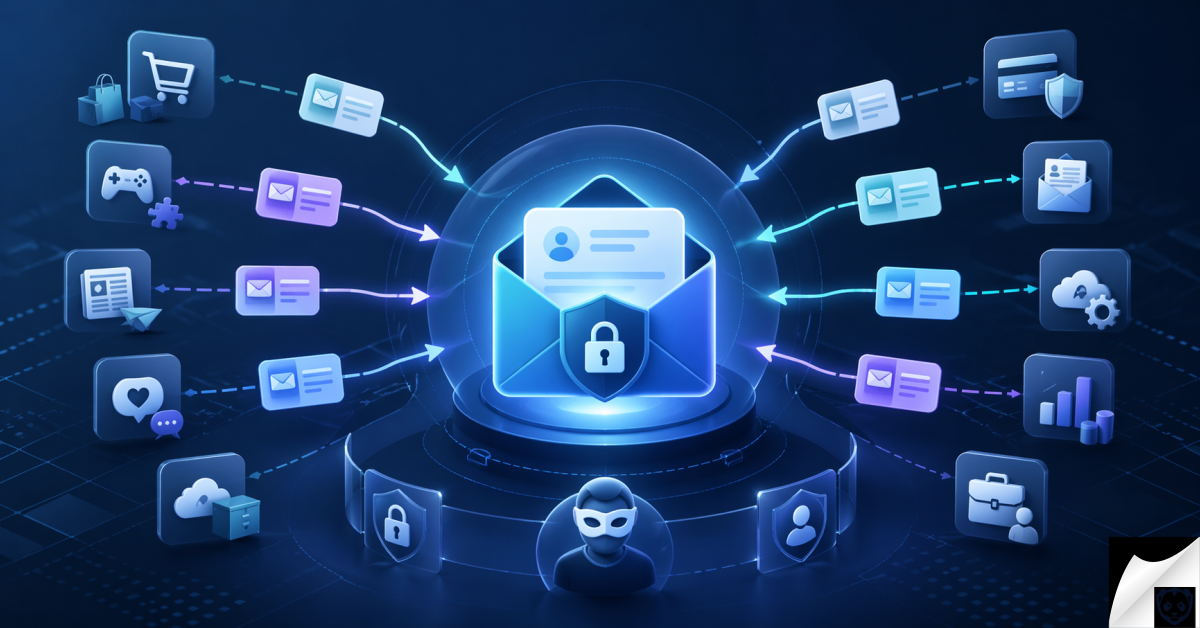
Best email alias services are no longer niche privacy tools for technical users; they are becoming a practical layer of identity protection for anyone who signs up for apps, shops online, subscribes to newsletters, tests SaaS products, or manages sensitive business accounts.
Table Of Content
- Executive Summary: Quick Answer
- How This Article Was Researched
- What Is an Email Alias Service?
- Email Alias vs Disposable Email vs Private Relay
- Why Email Aliases Matter in 2026
- Real Risk of Using One Email Address Everywhere
- Where Email Aliases Reduce Exposure
- Best Email Alias Services in 2026
- SimpleLogin: Best Overall for Advanced Privacy Control
- Firefox Relay: Best for Beginner-Friendly Email Masking
- DuckDuckGo Email Protection: Best Free Option for Tracker Blocking
- Apple Hide My Email: Best for iCloud+ and Apple Ecosystem Users
- Addy.io: Best for Open-Source and Highly Customizable Aliasing
- Proton Pass Hide-My-Email Aliases: Best for Proton Ecosystem Users
- Fastmail Masked Email: Best for Fastmail and 1Password Workflows
- Custom-Domain Alias Setups: Best for Advanced Portability
- Email Alias Services Compared
- What Email Aliases Actually Reduce
- What Email Aliases Do Not Solve
- How to Use Email Aliases Without Creating New Risks
- Readable Aliases vs Random Aliases
- Enterprise Use Cases for Email Alias Services
- Best Email Alias Services Defense Framework: How to Protect Your Real Inbox
- Tools and Mitigation Strategies That Work Alongside Email Aliasing
- Strategic Analysis for 2026
- Panda Analyst Insight
- Common Mistakes to Avoid
- Privacy Conscious Users and Security Teams
- Best Email Alias Services in 2026
- What is the best email alias service in 2026?
- Are email alias services safe?
- Is an email alias better than a disposable email?
- Can I reply from an email alias?
- Do email aliases stop phishing?
- Should I use email aliases for banking?
- What is the difference between email aliasing and plus addressing?
- Can businesses use email aliases for security?
- Choosing the Right Email Alias Strategy
Your email address is often the first identifier a company receives and the first identifier an attacker tests. It connects password resets, receipts, loyalty programs, cloud storage, banking notifications, social media profiles, and workplace tools. When the same address appears everywhere, it becomes a durable tracking handle across the web.
Email aliases solve a narrow but important problem: they let you give each service a different address while forwarding mail to your real inbox. That reduces spam exposure, makes breaches easier to contain, and helps you identify which vendor, newsletter, or app leaked or shared your address.
Using an alias prevents your primary address from falling into the wrong hands. If you’ve been using your real email for every online registration over the years, there is a high probability it is already circulating on the dark web. Find out if your inbox is currently compromised by learning How to Check if Your Email Was Leaked.
This Panda Reports guide evaluates email alias services from a privacy, security, usability, and enterprise risk perspective. It is not an affiliate ranking. The goal is to help readers choose the right email masking architecture for their risk profile, not to push a single product as a universal answer.
By: Panda Reports Privacy Research Desk
Reviewed by: Panda Reports Security Review Editor
Published: April 24, 2026
Last Updated: April 24, 2026
Executive Summary: Quick Answer
The best email alias service for most privacy-conscious users is SimpleLogin if they want strong alias control, custom-domain flexibility, and the ability to reply from aliases. For users who want a simpler free starting point, DuckDuckGo Email Protection and Firefox Relay are easier to adopt, while Apple Hide My Email is the most convenient option for people already using iCloud+.
Email aliases do not make you anonymous and they do not replace password managers, passkeys, MFA, or secure email gateways. Their value is exposure reduction: unique aliases limit the blast radius of breaches, make spam easier to shut off, and give users and security teams better visibility into where an address was leaked or misused.
How This Article Was Researched
This article was researched using official documentation from SimpleLogin, Mozilla Firefox Relay, DuckDuckGo, Apple, Addy.io, Proton, and Fastmail, alongside public security guidance from CISA, NIST, OWASP, the FBI Internet Crime Complaint Center, and the FTC Consumer Sentinel Network. Feature claims were checked against provider documentation available at the time of publication.
Masking your email address is a foundational step in taking back your online anonymity, but it is only one piece of the puzzle. To build a comprehensive defense strategy that covers your web browsers, mobile devices, and daily digital habits, explore our masterclass on How to Protect Your Digital Privacy in 2026 | Ultimate Guide.
Panda Reports did not conduct paid lab testing or claim hands-on deliverability benchmarking for this article. The analysis is based on public documentation, threat modeling, common enterprise identity patterns, and security architecture principles. Pricing and plan limits change frequently, so readers should verify current subscription details on each provider’s official website before purchasing.
What Is an Email Alias Service?
An email alias service creates an alternative email address that forwards messages to your real inbox. Instead of giving every website your personal address, you create a unique alias for each account, vendor, newsletter, or one-time signup.
For example, your real inbox might be alex@examplemail.com, but an online store only sees store-7k2m@aliasdomain.com. If that store leaks your address or starts sending unwanted messages, you can disable that alias without changing your main email account.
The key security idea is identity compartmentalization. Each alias becomes a separate channel. If one channel is abused, you can shut it off or investigate it without disrupting the rest of your digital life.
Email Alias vs Disposable Email vs Private Relay
Several terms are used loosely in privacy marketing, but they are not identical. Understanding the difference helps you avoid using the wrong tool for an important account.
| Term | What It Means | Best Use | Main Risk |
|---|---|---|---|
| Email alias | A forwarding address controlled by you that delivers mail to your real inbox. | Shopping, newsletters, SaaS accounts, forums, vendor signups. | The alias provider becomes a trust point for forwarded mail. |
| Disposable email | A temporary inbox or throwaway address, often public or short-lived. | Low-value one-time verification. | Unsafe for accounts you may need to recover later. |
| Catch-all domain | A custom domain configured to receive mail for any address before the @ symbol. | Advanced users who want unlimited flexible aliases. | Can attract spam if the domain is guessed or leaked. |
| Private relay | A service that forwards messages while hiding the destination email address. | Privacy-preserving signups inside a platform ecosystem. | May be less flexible than a full alias management tool. |
| Plus addressing | Adding text after a plus sign, such as name+shop@example.com. | Basic filtering in supported inboxes. | Easy to strip or identify; does not truly hide the base address. |
| Full mailbox | A separate email account with its own inbox, login, and storage. | Separate identities or business roles. | More operational overhead and recovery complexity. |
A proper email alias service is usually more useful than disposable email because it keeps the address manageable over time. It is also stronger than plus addressing because a vendor or attacker cannot simply remove the plus tag to reveal your real address.
While an email alias service perfectly protects your inbox from spam and data brokers, your internet traffic and physical location remain completely visible without the right network tools. To mask your IP address and encrypt your daily browsing, pair your alias with one of our top-rated recommendations from the Best VPN Services 2026 | Speed & Security Comparison.
Why Email Aliases Matter in 2026
Email remains one of the most valuable identifiers in cybercrime because it links identity, account recovery, and communication. The FBI’s 2025 Internet Crime Report reported nearly $21 billion in cyber-enabled crime losses, while the FTC’s latest Consumer Sentinel reporting showed consumers reported more than $12.5 billion in fraud losses in 2024. Those figures are not “email alias statistics,” but they show the scale of the scam and account-abuse environment where email exposure matters.
Attackers do not need your password to start profiling you. A leaked email address can reveal which services you use, which stores you buy from, which productivity tools you rely on, and which organizations may be able to reset your accounts. That information improves phishing credibility.
OWASP describes credential stuffing as the use of stolen username and password pairs, often sourced from breaches or credential dumps. Because many websites use email addresses as usernames, email reuse gives attackers a reliable starting point for automated account takeover attempts.
Real Risk of Using One Email Address Everywhere
Using the same email address for every account creates a correlation graph. Retailers, publishers, apps, analytics companies, advertisers, brokers, and criminals can all treat that address as a persistent identifier. Even when your name is not visible, the email address may be enough to connect activity across services.
The immediate symptom is spam. The deeper problem is mapping. When attackers know that one address belongs to your banking account, cloud account, travel account, and work-adjacent services, they can craft messages that look timely and personal.
A phishing email sent to a generic address is noisy. A phishing email sent to an alias used only for a specific travel booking site is easier to classify. If a “flight refund” message arrives at an alias created for a different SaaS tool, the mismatch is a useful signal. If every account uses the same email, that signal disappears.
Where Email Aliases Reduce Exposure
Email aliases are especially valuable in four recurring scenarios.
- Data breaches: If a vendor leaks an alias, you can disable that alias and know where the exposure likely originated.
- Credential stuffing: Unique aliases make it harder to reuse one email/password pair across unrelated services.
- Spam and marketing leakage: A vendor-specific alias shows which service sold, shared, or mishandled your address.
- Phishing attribution: Suspicious mail sent to a single-purpose alias gives defenders context about the lure.
This is not a replacement for MFA. CISA emphasizes that multi-factor authentication is a powerful way to protect accounts, and NIST’s digital identity guidance remains the baseline for thinking about authentication assurance. Alias strategy works best as a companion layer: reduce exposure first, then harden account access.
Best Email Alias Services in 2026
The best email alias services are not identical. Some are designed for casual users who want quick email masking. Others are better for technical users, custom domains, business workflows, or privacy-focused ecosystems. The right choice depends on how much control you need and how much complexity you are willing to manage.
SimpleLogin: Best Overall for Advanced Privacy Control
SimpleLogin is one of the strongest choices for users who want a dedicated email alias service rather than a lightweight masking feature. It supports creating aliases, using browser and mobile workflows, managing aliases over time, and replying from aliases so your real address remains hidden during conversations.
SimpleLogin joined Proton in 2022, and Proton now integrates hide-my-email alias workflows across parts of its ecosystem. That matters for users who already rely on Proton Mail or Proton Pass, but SimpleLogin also remains useful for people who forward to other inbox providers.
Best for: Privacy-focused individuals, security practitioners, journalists, researchers, and users who want custom-domain support and long-term alias management.
Key features: Alias creation, custom aliases, random aliases, custom-domain support, reverse aliasing for replies, browser extension workflows, mobile access, and Proton ecosystem integration where applicable.
Privacy strengths: SimpleLogin gives users granular control. A user can create a dedicated alias for each service, disable it when it becomes noisy, and separate account identities more effectively than with plus addressing.
Limitations: Advanced features may require a paid plan, and the configuration options can feel more technical than beginner-focused tools. Custom domains also require DNS understanding and operational discipline.
Who should avoid it: Users who only need occasional low-friction masking and do not want to learn alias management concepts.
Security considerations: Treat the destination inbox as critical infrastructure. If your real inbox is compromised, aliases will not protect forwarded mail. Use strong authentication and recovery controls on both the alias service and the destination mailbox.
Enterprise relevance: SimpleLogin-style workflows are useful for security research signups, vendor-specific intake addresses, executive privacy, and controlled public contact points. Enterprises should govern ownership, DNS, retention, and offboarding before deploying aliases at scale.
Firefox Relay: Best for Beginner-Friendly Email Masking
Firefox Relay is Mozilla’s email and phone masking service. It is designed for users who want to generate masks quickly and forward messages without sharing their real email address. Relay Premium also offers a unique Relay email domain, email replies from masks, promotional email blocking, tracker removal, and phone masking in supported regions.
Best for: Users who want a simple privacy layer backed by Mozilla and integrated with browser workflows.
Key features: Random email masks, a Relay dashboard, tracker removal, reply support on premium plans, a unique Relay email domain on premium plans, and phone masking availability in specific regions such as the US and Canada.
Privacy strengths: Firefox Relay lowers the barrier to adoption. It is well-suited for people who will not configure DNS or custom domains but will use a mask when a browser suggests one.
Limitations: It is not as flexible as a full custom-domain alias architecture. Its “custom domain” concept is a unique Relay domain under Mozilla’s masking system rather than the same level of domain portability an advanced user may want.
Who should use it: Users who want quick email masks for newsletters, online stores, forms, and low-to-medium sensitivity accounts.
Who should avoid it: Users who need heavy custom-domain control, extensive self-hosting options, or highly customized routing logic.
Security considerations: Relay is strongest when paired with unique passwords and MFA. It should not be used as the only security control for account recovery.
Enterprise relevance: Firefox Relay is more consumer-oriented, but the model is relevant to enterprise privacy training: employees understand masking more easily when the workflow is simple and visible.
DuckDuckGo Email Protection: Best Free Option for Tracker Blocking
DuckDuckGo Email Protection provides a free Duck Address and private email addresses that forward to a user’s existing inbox. DuckDuckGo states that the service removes multiple types of hidden email trackers and supports private addresses without requiring users to switch email providers or apps.
Best for: Users who want a free, low-friction way to reduce email tracking and hide their real address during signups.
Key features: A personal Duck Address, private Duck addresses, email forwarding, tracker removal, link tracking protection in supported workflows, and the ability to reply directly from Duck Addresses according to DuckDuckGo’s official materials.
Privacy strengths: DuckDuckGo Email Protection is easy to adopt because it sits between the sender and your existing inbox. It is useful for people who want privacy benefits without moving mail providers.
Limitations: It does not provide the same advanced custom-domain workflow as services built for power users. Organizations with strict email retention or compliance requirements should evaluate policy fit before using it for business communications.
Who should use it: Users who want to start masking their real inbox today with minimal setup.
Who should avoid it: Users who need deep enterprise administration, custom domains, or complex alias routing.
Security considerations: Tracker removal can improve privacy, but it does not neutralize malicious attachments, credential phishing, or unsafe links. Continue using browser protections, MFA, and cautious link handling.
Enterprise relevance: The strongest enterprise lesson from DuckDuckGo’s model is tracker reduction. Marketing emails, vendor newsletters, and third-party communications often contain tracking pixels that can disclose open times, device context, and engagement behavior.
Apple Hide My Email: Best for iCloud+ and Apple Ecosystem Users
Apple Hide My Email is built into iCloud+ and Sign in with Apple workflows. Apple’s documentation says it generates unique, random addresses that forward to a personal inbox, allowing users to keep their real email address private when signing up for apps, websites, newsletters, or sending mail in supported Apple Mail workflows.
The ultimate advantage of using an email alias is damage control. If a specific service you use gets breached, you can simply delete that single compromised alias without abandoning your main inbox. However, managing the fallout of a corporate leak requires a few more critical steps. Prepare yourself by bookmarking our What to Do After a Data Breach: Step-by-Step Guide.
Best for: iPhone, iPad, Mac, and iCloud+ users who want privacy protection built into the Apple experience.
Key features: Random email address generation, forwarding to a personal inbox, Safari and iCloud integration, Sign in with Apple support, and the ability to send or reply through Hide My Email in supported Apple Mail and iCloud workflows.
Privacy strengths: Convenience is the main advantage. Many users will use a privacy feature when it appears directly in Safari, Mail, or iCloud settings at the moment they need it.
Limitations: It is best inside Apple’s ecosystem. Users who need cross-platform custom-domain control, extensive alias analytics, or non-Apple workflow consistency may prefer a dedicated alias service.
Who should use it: Apple users who already pay for iCloud+ and want seamless masking for apps, websites, and casual email interactions.
Who should avoid it: Users who primarily operate on non-Apple platforms or want a vendor-independent alias architecture.
Security considerations: Protect the Apple Account with strong authentication and a recovery plan. If your Apple identity becomes unavailable, aliases tied to that ecosystem may become harder to manage.
Enterprise relevance: Hide My Email is not a substitute for enterprise email governance, but executives and staff who use Apple devices may rely on it for personal privacy. Security teams should distinguish between personal masking and approved business communication channels.
Addy.io: Best for Open-Source and Highly Customizable Aliasing
Addy.io, formerly known as AnonAddy, is an open-source anonymous email forwarding service. Its public documentation and product materials emphasize creating aliases, protecting a real inbox from spam, and using different addresses for different services.
Best for: Technical users, open-source supporters, and people who want strong customization options.
Key features: Email aliases, anonymous replies, custom domains, browser extensions, API workflows, and self-hosting options for advanced users.
Privacy strengths: Addy.io gives technically confident users a high degree of control. The open-source model also lets security-minded users evaluate the project more closely than they could with fully closed services.
Limitations: It is less beginner-oriented than Apple Hide My Email, DuckDuckGo Email Protection, or Firefox Relay. Users need to understand alias behavior, recipient verification, domain settings, and recovery implications.
Who should use it: Advanced privacy users, developers, researchers, and people who want control over their aliasing model.
Who should avoid it: Users who prefer a polished, minimal setup with few decisions.
Security considerations: If self-hosting, the user becomes responsible for infrastructure security, mail deliverability, patching, abuse handling, and backup. Self-hosting increases control but also increases operational burden.
Enterprise relevance: Addy.io’s model is useful for understanding how aliasing can become part of lightweight identity segmentation. Enterprises considering self-hosted aliasing should involve email administrators, legal, compliance, and SOC teams before deployment.
Proton Pass Hide-My-Email Aliases: Best for Proton Ecosystem Users
Proton Pass includes hide-my-email aliases powered by SimpleLogin by Proton. Proton states that aliases can be used as often as the user chooses until switched off or deleted, and that Proton Pass forwards emails rather than storing them as a mailbox.
Best for: Proton Mail and Proton Pass users who want password management and alias creation in the same workflow.
Key features: Hide-my-email alias creation, forwarding to an inbox, SimpleLogin integration, and account management through Proton Pass or Proton Mail workflows depending on the user’s setup.
Privacy strengths: The main advantage is workflow alignment. Creating an alias while saving a login encourages users to pair each account with both a unique email and a unique password.
Limitations: Users who do not want to adopt the Proton ecosystem may prefer SimpleLogin directly or another standalone service.
Who should use it: Proton users who want privacy hygiene integrated into credential management.
Who should avoid it: Users who want a provider-neutral setup across unrelated password managers and email services.
Security considerations: The Proton account itself becomes highly important because it may hold password and alias workflows. Use phishing-resistant MFA where available and maintain recovery codes securely.
Enterprise relevance: The combined password-plus-alias workflow is a useful model for businesses: identity protection improves when account creation, credentials, MFA, and alias records are managed together.
Fastmail Masked Email: Best for Fastmail and 1Password Workflows
Fastmail Masked Email lets users create unique email addresses for online accounts while keeping their real address private. Fastmail documentation also describes masked email addresses using Fastmail domains or custom domains configured in the account. The 1Password integration allows users to create and manage masked emails during login creation workflows.
Best for: Fastmail users and 1Password users who want email masking integrated into account creation.
Key features: Masked email creation, custom-domain support in Fastmail, account-level management, and 1Password integration for generating addresses alongside credentials.
Privacy strengths: Fastmail’s masked email model is compelling because it connects identity hygiene with password hygiene. A unique email plus a unique password gives each service a more isolated credential pair.
Limitations: It is most useful to people already using Fastmail or willing to adopt it. Users who prefer a standalone alias service may find SimpleLogin or Addy.io more flexible.
Who should use it: Fastmail customers, 1Password users, and people who want masked emails as part of a broader email provider experience.
Who should avoid it: Users who do not want to move email workflows or rely on the Fastmail ecosystem.
Security considerations: As with all alias services, the destination mailbox and account recovery settings are critical. Protect Fastmail and password manager accounts with strong MFA.
Enterprise relevance: Fastmail’s model shows the value of connecting alias generation to password management. Enterprises can learn from this pattern even if they use different tools internally.
Custom-Domain Alias Setups: Best for Advanced Portability
A custom-domain alias setup lets you create addresses such as amazon@yourdomain.com, banking@yourdomain.com, or random strings at a domain you control. This can be done through an alias provider, a mailbox provider, or a self-managed mail routing service.
Best for: Advanced users who want portability and long-term control.
Key features: Domain ownership, catch-all routing, service-specific aliases, migration flexibility, and potential integration with business email policies.
Privacy strengths: If you own the domain, you are not locked into a single provider forever. You can migrate routing later if necessary.
Limitations: A custom domain can create correlation risk. If every alias ends in the same personal domain, a determined observer may connect those identities even if each local part is unique.
Who should use it: Technical users, families with shared domain governance, small businesses, and privacy-conscious professionals.
Who should avoid it: Users who want maximum anonymity from casual observers or who do not want to manage DNS and recovery.
Security considerations: Protect the domain registrar account with phishing-resistant MFA. If attackers gain control of the domain, they may redirect mail and compromise account recovery flows.
Enterprise relevance: Businesses can use custom domains for vendor-specific intake, temporary projects, and attribution. However, they must manage SPF, DKIM, DMARC, retention, legal hold, ownership, and offboarding.
Email Alias Services Compared
The table below summarizes the strongest use case for each service. It avoids exact pricing because provider plans change. Always verify current plan limits, supported countries, and subscription terms on the official provider website before making a decision.
| Service | Best For | Free Option | Custom Domain Support | Reply From Alias | Tracker Blocking | Beginner Friendliness | Best Use Case |
|---|---|---|---|---|---|---|---|
| SimpleLogin | Advanced privacy control | Yes, with limits | Yes, typically on paid plans | Yes | Not the primary focus | Medium | Long-term alias management and custom domains |
| Firefox Relay | Simple email masking | Yes, with limits | Unique Relay domain on Premium, not full domain portability | Premium support | Yes | High | Browser-friendly masking for casual signups |
| DuckDuckGo Email Protection | Free tracker reduction | Yes | No full custom-domain model | Supported according to DuckDuckGo materials | Yes | High | Free forwarding with tracker removal |
| Apple Hide My Email | Apple ecosystem users | Requires iCloud+ | No full custom-domain alias model | Supported in Apple Mail and iCloud workflows | Not the primary focus | High for Apple users | Seamless masking in Safari, Mail, iCloud, and Sign in with Apple |
| Addy.io | Open-source and technical users | Yes, with limits | Yes | Yes | Not the primary focus | Medium to Low | Customizable aliasing and self-hosting options |
| Proton Pass Aliases | Proton users | Plan-dependent | Via SimpleLogin capabilities where applicable | Alias workflow supported through Proton/SimpleLogin model | Not the primary focus | High for Proton users | Creating aliases alongside saved logins |
| Fastmail Masked Email | Fastmail and 1Password users | Plan-dependent | Yes, according to Fastmail documentation | Provider workflow dependent | Not the primary focus | Medium | Masked emails integrated with mailbox and password workflows |
What Email Aliases Actually Reduce
Email aliases are most effective when the threat is based on exposure, correlation, or unwanted contact. They are less effective when the threat is malware, compromised devices, or weak authentication.
Why is protecting your primary inbox more critical now than ever? Because once your real email and name are exposed in a corporate leak, cybercriminals feed this raw data into advanced algorithms to generate highly convincing, personalized phishing attacks. Understand this terrifying new reality in our deep dive: How AI is Weaponizing Dark Web Data Leaks in 2026.
- Spam exposure: A unique alias lets you shut off one noisy sender without abandoning your real inbox.
- Breach blast radius: If a breached service exposes one alias, the attacker does not automatically receive the email address used for every other account.
- Phishing attribution: Messages sent to a single-purpose alias reveal which service context the attacker may be abusing.
- Newsletter tracking: Aliases make it easier to separate newsletter identities and detect unexpected sharing.
- Vendor leakage: A procurement alias used only for one vendor can identify which vendor leaked, sold, or mishandled the address.
- Account enumeration: Unique aliases make it harder for attackers to test one email address across many login portals.
- Credential stuffing visibility: If login alerts appear for an alias used only on one service, the reuse path is clearer.
- Social engineering reconnaissance: Aliases reduce the amount of service-to-identity mapping available to attackers.
What Email Aliases Do Not Solve
Email aliases are exposure controls, not complete security controls. They do not remove the need for strong authentication, endpoint security, secure browsing habits, or incident response planning.
- Malware infections: An alias will not stop malware running on your device.
- Weak passwords: If the password is reused or easily guessed, the account remains exposed.
- Lack of MFA: Accounts without MFA remain vulnerable to stolen credentials.
- Device fingerprinting: Websites may still identify you through browser, device, and behavioral signals.
- Payment identity exposure: Shipping addresses, card details, and billing names can still reveal identity.
- Browser cookies: Aliases do not block cookie-based tracking across web sessions.
- SIM swapping: Aliases do not protect phone-number-based recovery flows.
- Compromised inboxes: If the destination inbox is taken over, forwarded alias mail is exposed.
How to Use Email Aliases Without Creating New Risks
The safest alias strategy is structured. Random use is better than no use, but disciplined use gives you clearer security signals and fewer recovery problems.
Use unique aliases for online shopping, newsletters, SaaS trials, forums, downloads, webinars, loyalty programs, and one-time signups. These are the places where addresses commonly enter marketing systems, third-party processors, or breach data.
For critical accounts such as banking, government services, tax portals, primary cloud storage, and domain registrars, think carefully before switching to an alias. A permanent alias may be appropriate, but only if you understand how account recovery works and how you will regain access if the alias provider, domain, or destination inbox becomes unavailable.
Avoid temporary public inboxes for important accounts. Disposable email can be useful for very low-value verification, but it is dangerous for anything you may need to recover later. If you cannot control the inbox long term, it should not protect a valuable account.
Pair aliases with a password manager record. The record should show the service name, login URL, unique password, MFA method, alias used, and recovery notes. This creates a single source of truth when you need to disable an alias or investigate suspicious mail.
Readable Aliases vs Random Aliases
Readable aliases such as amazon@yourdomain.com are convenient because humans understand them. They also create risk because they reveal which service the alias belongs to. Random aliases such as q9f4k2@aliasdomain.com protect context better but are harder to manage without a password manager.
For most users, the right compromise is readable labels stored inside the alias manager, with the actual address kept random. For example, the alias manager can show “Amazon shopping account” while the address itself remains non-obvious.
Custom domains deserve special care. They improve control and portability, but they can also become a correlation point. A privacy-sensitive user may not want every alias to end in a personal domain that clearly belongs to them.
Enterprise Use Cases for Email Alias Services
Enterprises should not treat consumer alias tools as a replacement for governed email systems, secure email gateways, or identity platforms. The concept, however, is highly useful for reducing exposure and improving attribution.
Vendor-specific aliases help procurement and SaaS teams understand which vendor is responsible when a sales address begins receiving unrelated spam. A company can create unique addresses for trials, demos, contracts, and partner portals.
Security research aliases are useful for threat intelligence teams subscribing to underground-monitoring services, malware sandboxes, vendor portals, conferences, and breach-notification feeds. Segmented aliases reduce cross-contamination between research identities.
Executive privacy aliases can reduce exposure for board members, founders, and senior leadership. Attackers often profile executives through conference pages, charity boards, investor portals, and personal subscriptions. Aliasing does not hide everything, but it reduces unnecessary address reuse.
M&A and due diligence aliases can help deal teams separate confidential project communications from ordinary corporate intake. The benefit is not secrecy by itself; it is cleaner routing, lower accidental exposure, and easier post-project shutdown.
Bug bounty and disclosure inboxes benefit from structured aliases because public-facing security addresses receive high volumes of spam, low-quality reports, and automated outreach. Aliases can separate intake channels by program, campaign, or temporary project.
Temporary project aliases are useful for pilots, beta programs, and short-term partnerships. When the project ends, the address can be archived, redirected, or disabled according to retention policy.
Enterprises should combine aliasing with identity governance, DMARC, SPF, DKIM, secure email gateways, SIEM monitoring, DLP, conditional access, and FIDO2 phishing-resistant MFA. Without governance, alias sprawl can become another unmanaged identity surface.
Best Email Alias Services Defense Framework: How to Protect Your Real Inbox
The best email alias services work when they are part of a deliberate defense framework. For individuals, that framework can be simple. For enterprises, it should be documented, owned, reviewed, and integrated with existing security operations.
- Classify account sensitivity. Separate critical accounts, financial accounts, personal accounts, newsletters, shopping, SaaS trials, and throwaway signups.
- Assign alias types by risk level. Use durable aliases for important accounts, random aliases for routine signups, and temporary aliases only for low-value interactions.
- Pair aliases with password manager records. Every alias should map to a service, login URL, password record, MFA method, and recovery note.
- Enforce MFA on critical accounts. Prefer passkeys or FIDO2 security keys where available. Use authenticator apps when phishing-resistant MFA is not supported.
- Monitor breach exposure. Watch for aliases appearing in breach alerts, dark web monitoring, vendor notifications, or unusual login emails.
- Disable aliases that receive suspicious mail. If an alias receives unrelated spam or phishing, investigate the source and shut it down if appropriate.
- Review alias inventory quarterly. Remove unused aliases, confirm critical ones still work, and check that recovery paths are documented.
- Use custom domains only with operational ownership. Secure the registrar, DNS, mailbox routing, admin accounts, and renewal process.
- Build a recovery plan before changing critical login emails. Know how you will recover accounts if an alias provider, domain, or destination inbox is unavailable.
The strongest practical pattern is one account, one alias, one password, one MFA method. This does not eliminate account takeover risk, but it reduces reuse and improves investigation quality when suspicious activity appears.
Tools and Mitigation Strategies That Work Alongside Email Aliasing
Email aliasing should be part of a layered privacy and security stack. The following tool categories matter more than any single vendor choice.
- Email alias services: Reduce exposure of the real inbox and provide account-level compartmentalization.
- Password managers: Store unique passwords and map aliases to accounts.
- FIDO2 security keys and passkeys: Provide phishing-resistant authentication for high-value accounts.
- Authenticator apps: Offer stronger protection than passwords alone when passkeys or hardware keys are unavailable.
- Secure email gateways: Filter phishing, malware, impersonation, and suspicious attachments in enterprise environments.
- SIEM platforms: Correlate suspicious email events, login alerts, and vendor-specific alias abuse.
- EDR/XDR: Detect endpoint compromise that aliases cannot prevent.
- Breach monitoring: Alert when aliases or real addresses appear in exposed datasets.
- DNS security: Protect against malicious domains, phishing infrastructure, and unsafe resolution.
- DMARC monitoring: Reduce spoofing of corporate domains and improve email authentication visibility.
- Browser privacy controls: Limit cookies, trackers, fingerprinting, and unsafe scripts.
- Data broker removal workflows: Reduce public exposure of personal information that can be paired with email addresses.
The practical goal is not to build a complicated privacy stack for its own sake. The goal is to remove easy attacker paths. Aliases reduce address exposure, password managers reduce password reuse, MFA reduces login compromise, and monitoring gives you a chance to respond before abuse escalates.
Strategic Analysis for 2026
Panda Analyst Insight
Email aliases are moving from privacy hygiene into identity hygiene. That distinction matters. Privacy hygiene is about reducing unwanted tracking. Identity hygiene is about reducing the usefulness of exposed identifiers during attacks.
Attackers increasingly benefit from breached email-to-service mappings. Knowing that a specific address belongs to a cloud storage account, a payroll portal, a travel platform, or a developer tool makes phishing more credible. The more precise the mapping, the less generic the lure needs to be.
An alias strategy gives defenders a lightweight attribution layer. If a procurement-only alias receives credential phishing, security teams can infer which vendor ecosystem or mailing list may have leaked or been scraped. That does not prove liability, but it shortens the investigation path.
Enterprises should treat aliasing as a low-cost deception signal, not merely a privacy feature. A unique address given to one vendor acts like a marker. If it appears somewhere else, the organization has evidence of leakage, sharing, compromise, or scraping.
The non-obvious risk is readability. Human-friendly aliases are easier to operate but can reveal business relationships. Random aliases improve privacy but require stronger inventory management. For 2026 security teams, the winning model is not “aliases everywhere”; it is risk-based alias design.
Common Mistakes to Avoid
- Using one alias everywhere: This recreates the original problem. The value comes from separation.
- Using temporary inboxes for important accounts: You may lose recovery access later.
- Ignoring recovery implications: Critical accounts need documented recovery paths before changing login emails.
- Failing to secure the real destination inbox: If the real inbox is compromised, forwarded mail is exposed.
- Skipping MFA: Aliases reduce exposure, but MFA protects account access.
- Treating aliases as security awareness replacement: Users still need to recognize phishing, scams, and unsafe links.
- Choosing services without reviewing policies: Check retention, logging, jurisdiction, account recovery, abuse handling, and data-processing terms.
- Forgetting domain renewal: If a custom domain expires, account recovery emails may be lost or intercepted by a future domain owner.
Privacy Conscious Users and Security Teams
- Email aliases reduce exposure, not all risk. They hide your real address but do not stop malware, weak passwords, or compromised devices.
- Unique aliases help identify leaks. A single-purpose alias gives you context when spam or phishing appears.
- Critical accounts require recovery planning. Do not use temporary or poorly governed aliases for banking, government, domain registrar, or primary cloud accounts.
- The best results come from combining aliases with password managers, MFA, and breach monitoring. Aliasing is strongest when paired with unique credentials and strong authentication.
- Enterprises can use aliasing for vendor segmentation and threat attribution. The concept helps procurement, security research, executive privacy, and temporary project workflows.
Best Email Alias Services in 2026
What is the best email alias service in 2026?
For most advanced privacy users, SimpleLogin is the strongest overall choice because it offers dedicated alias management, reply workflows, and custom-domain flexibility. For beginners, DuckDuckGo Email Protection and Firefox Relay are easier starting points. Apple Hide My Email is best for users already committed to iCloud+.
Are email alias services safe?
Reputable email alias services can be safe when used correctly, but they become part of your email trust chain. Protect the alias account and destination inbox with strong passwords, MFA, and recovery controls. Review each provider’s privacy policy, logging practices, jurisdiction, and recovery process.
Is an email alias better than a disposable email?
For real accounts, yes. An email alias is usually better because you control it long term and can receive recovery messages later. Disposable email is only appropriate for low-value, temporary verification where you do not care about future access.
Can I reply from an email alias?
Many dedicated alias services support replying from an alias, including SimpleLogin and Addy.io. Firefox Relay Premium, DuckDuckGo Email Protection, Apple Hide My Email, Proton/SimpleLogin workflows, and Fastmail workflows also provide reply or send capabilities in supported contexts. Always verify the current provider documentation for exact limitations.
Do email aliases stop phishing?
Email aliases do not stop phishing by themselves. They reduce exposure and improve attribution. A phishing message sent to a single-purpose alias is easier to evaluate, but users still need MFA, safe browsing habits, link inspection, and phishing-aware behavior.
Should I use email aliases for banking?
Use caution. A durable alias can protect your real address, but only if you understand account recovery and trust the alias provider. For banking, government, and primary recovery accounts, use a permanent, well-documented alias rather than a temporary address. Enable strong MFA and keep recovery information current.
What is the difference between email aliasing and plus addressing?
Plus addressing adds a tag to your real email, such as name+shopping@example.com. It is useful for filtering but does not hide your base address. Email aliasing creates a separate forwarding address, which provides stronger privacy and compartmentalization.
Can businesses use email aliases for security?
Yes, but businesses should use governed workflows. Vendor-specific aliases, research aliases, public intake aliases, and temporary project aliases can improve attribution and reduce exposure. Enterprises should integrate aliasing with identity governance, DMARC, secure email gateways, SIEM monitoring, DLP, conditional access, and phishing-resistant MFA.
Choosing the Right Email Alias Strategy
The best email alias services give users and organizations a practical way to reduce email exposure without abandoning their existing inbox. They help control spam, limit breach impact, reduce cross-site tracking, and reveal which service may have leaked or shared an address.
The right choice depends on your operating model. SimpleLogin and Addy.io suit users who want control and customization. DuckDuckGo Email Protection and Firefox Relay are better for low-friction masking. Apple Hide My Email is ideal for iCloud+ users. Proton Pass aliases and Fastmail Masked Email are compelling when alias creation is tied directly to password management or mailbox workflows.
Email aliasing is not a magic anonymity tool. It will not protect a weak password, infected device, compromised inbox, or account with no MFA. But used correctly, it is one of the most practical privacy and security layers available: easy to start, measurable when leaks occur, and valuable for both individuals and enterprise defenders.
For Panda Reports readers, the strongest recommendation is simple: stop giving every service the same address. Use aliases deliberately, document them carefully, secure the destination inbox, and treat email identity as part of your broader security architecture.


No Comment! Be the first one.